Smartphones

You could be the next target of scammers if you receive an email from this official Microsoft account


Online scams have proliferated in recent years. In 2024 alone, more than $16.6 billion was lost the FBI reported. The main reason why cybercrime continues to grow is that fraudsters are constantly devising new ways to trick victims into handing over their hard-earned money and data. A recent tactic used by some scammers involves sending emails from legitimate-looking Microsoft accounts, where they falsely claim that you need to pay for work done on your account.

The scam emails are from an official Microsoft account

Microsoft has many products under its umbrella other than the Windows operating system. One of these is Power BI, a business analytics platform that, according to Microsoft, offers “integrated tools and services to connect, visualize, and share data across your organization.” The service has an associated email address[email protected]used to send subscription emails.

To make sure you don’t miss an important notification, Microsoft clearly recommends approving this address in your spam filter. As it turns out, some online fraudsters are exploiting this trust, as has been happening recently reported that a user received an email from this address in which a scammer claimed that a $399 transaction had occurred on their account.
Unlike most scams, where you usually expect the scammer to give you a link in an email to make a fake payment, the hacker took a different approach here. The email stated that if you did not complete the transaction, you need to call the number provided to “cancel or receive an immediate refund.”
The woman to whom this email was sent called the number, where she was asked to install a remote access program on her phone. The goal of the hackers may be to gain access to his device through that app and steal his data. So, the main scam doesn’t start when you get the email. Instead, it starts when you call the given number and enter the requested program.
It is interesting that many similar cases have been reported on various internet forums. Another user on the Microsoft forum mentioned receiving an email from the same address where the scammer claimed that $600 worth of Bitcoin had been purchased through their account. If they didn’t buy (which they obviously didn’t), they were instructed to contact the number provided to reach the support team.

How can hackers use a Microsoft email address?
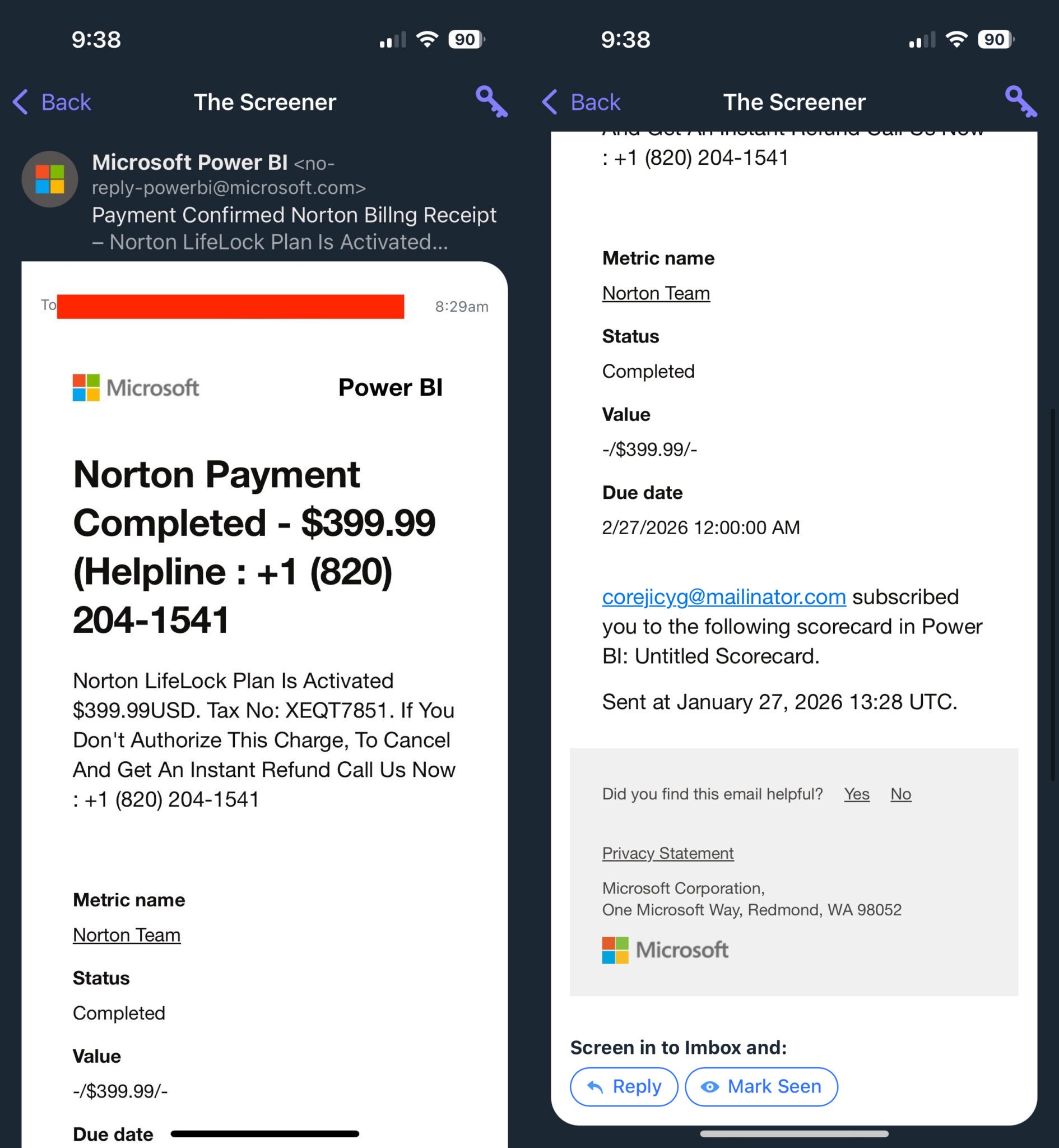
If you’ve read this far, you’re probably wondering how these phishing emails came from a Microsoft email address. As it turns out, Power BI allows you to add any external email address as a subscriber to the dashboard. Those addresses then receive emails sent to this official Microsoft address: [email protected].

The catch here is that the person who added your email address as a subscriber to the Power BI dashboard has permission to edit the content of the email, and this ability is what scammers exploit. They can add any valid email address to the dashboard, edit email content and all that transaction information, and send emails.

Since the email comes from an official Microsoft account, many users who don’t know how phishing scams work can end up believing it and losing their data to the scam. The email does not indicate that you are receiving this email only because your email address has been added as a subscriber to the Power BI dashboard, but as it is mentioned at the end of the email, many users may miss it. Fortunately, Microsoft has reportedly disabled the email subscription feature as a temporary fix while it develops a permanent solution.

How to keep yourself safe from those phishing scams

This is not the first time that Microsoft Power BI has been used to defraud users. In February last year, it was reported that the platform was being used to transmit phishing links. Fraudsters have recently exploited loopholes in other platforms PayPal too Google will trick users into their scams. For all these reasons, it is important to know how to spot a phishing email or message.

First, you should look for grammatical and spelling errors in emails or messages that you suspect are from malicious actors. Also, you should check for even the slightest misspelling in the sender’s domain. For example, a phishing email from mirosooft.com instead of the official microsoft.com.
In many of these scam emails and messages, you will be asked to enter an app or contact a number. You can also count on scam detection feature on your smartphones. Above all, always remember that companies like Microsoft will never ask you to install any remote access application or pay for unauthorized transactions.

Try Noble Mobile for only $10

Get unlimited talk, text, and data on the T-Mobile 5G Network and earn cash for data you don’t use.

Shop at Noble Moblie

Related Articles

Leave a Reply

Your email address will not be published. Required fields are marked *

Back to top button